


€200

Joomla Website Development: Build, Extend, Maintain
Joomla is our main stack — it also runs the site you are reading. We build projects from scratch, take over code left by other developers, and keep sites updated and running for years. You get an admin panel where you edit texts and prices yourself, and a developer who stays reachable after launch. We work with companies across Europe and beyond — the project language and time zone are no obstacle.

Three ways to build a site on Joomla
The template you choose determines the price, the launch date and — most importantly — whether you will be able to edit pages yourself. We work with all three options and say plainly which one fits your task and which would be overspending.

Plain Joomla, stock template
No licences
The Joomla core and the Cassiopeia template are distributed under the free GPL licence: you pay nothing for them at launch or later. Only hosting and a domain stay in the budget. By comparison, a commercial template or a site builder charges a subscription every year, and you cannot stop paying without losing the site.
Fastest launch
The stock template does not need designing or coding: the structure is already there, we fill it with your content and set up menus, forms and language versions. A site of 5–10 pages goes live in days rather than weeks. It is the shortest route to test the niche and start collecting enquiries.
Loading speed
The less third-party code, the faster the page. The stock template does not drag in a builder, animation libraries or a dozen fonts, so the site opens quickly even on cheap hosting and on a phone. Speed affects both search rankings and the share of visitors who do not leave before the page loads.
Standard design
We change colours, fonts, the logo and the arrangement of blocks and modules — the site looks like yours, but the underlying frame stays standard. If you need a bespoke layout with unusual sections, that is the YOOtheme option. We say so upfront so you do not expect from the basic option what it cannot give.
Changes via a developer
Texts, prices, news and products you change yourself in the admin panel. But rearranging blocks on a page or adding a new section is not possible without a visual builder — a developer will be needed. If you plan to reshape pages often on your own, budget for YOOtheme from the start.
Best for: an information site, a catalogue, an internal portal, a first version of a project to test demand.
Basic

YOOtheme Pro
Built with the mouse
A page is assembled from ready-made elements: grids, cards, sliders, forms, buttons. You drag blocks and see the result immediately — no coding and no developer involved. The site you are reading is built on this same builder, so you can judge what it can do right here.
Custom design
Unlike a ready-made theme, the layout is not limited by someone else's decisions: any grid, your own spacing, typography and colours. A library of ready layouts and sections comes with it — you can start from there and gradually tune the site to yourself without rebuilding it.
Dynamic content
Cards for services, articles, products and reviews are not coded by hand — they pull from Joomla articles. Add a new service and it appears by itself in the right grid, in the filter and in the menu. The more similar elements a site has, the more maintenance time this saves.
Images in WebP
The builder converts images to WebP itself, resizes them as needed and serves different versions for phone and desktop. The separate optimisation plugins that WordPress usually cannot do without are not needed here. The page weighs less and scores better in speed tests.
Paid licence
The YOOtheme Pro licence renews annually — that is what keeps updates and support coming. If you stop renewing, the site keeps working but stops receiving new builder versions. This is the only downside of the option, and we name it before work begins.
Best for: a commercial website you plan to develop yourself. This is also the stack behind the site you are reading now.
Our choice

JoomArt (JA Templates)
Ready-made industry bundle
JoomArt ships not just a template but an assembled site for an industry: a shop, a hotel, a clinic, a training centre. The structure, typical pages and the needed extensions are already wired together. All that remains is replacing the demo content with yours and tuning details — noticeably quicker than building from scratch.
Vendor extensions
The shop, booking, catalogue and multi-level menu are made by one vendor and designed to work together. This removes the usual problem of pieced-together solutions, where two extensions from different authors clash and break the site at the next update.
Framework T3/T4
The page grid, column arrangement, layouts for different sections and the multi-level menu are configured straight in the admin panel, without touching code. A developer is not needed for routine changes — though there is no full visual page builder here as in YOOtheme.
Many ready-made pages
The bundle already includes styled pages for services, the team, pricing, contacts and a blog. That leaves less work for the designer and front-end developer, so launch costs less. The trade-off is that the site will look recognisably similar to other projects built on the same template.
Vendor dependency
Updates to the template and its extensions follow the vendor's schedule, not Joomla's. If the vendor is late with compatibility for a new core version, updating the site has to wait. That is why we check before starting how actively the particular bundle is maintained.
Best for: a project that needs industry features immediately and a rich interface without months of design work.
Industry-specific
The Joomla websites we build
Strong development starts not with a template but with understanding how a company wins enquiries. We design the Joomla structure around your business process: categories and articles, language versions, permissions for the people who will run the site after launch. We work with companies in Europe and beyond — the project language and time zone are no obstacle for us.


What your website will be able to do
Not just a website but a working tool: enquiries and payments, language versions, a link to your accounting systems and statistics you can actually read. All of it is assembled from Joomla's built-in capabilities and proven extensions — without home-made workarounds that break at the first update.
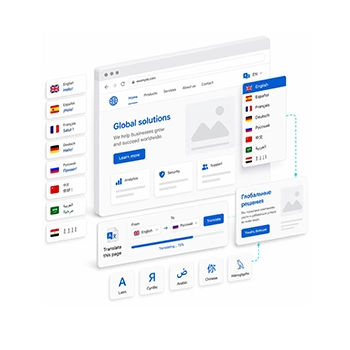
Language versions

Booking and appointments

Sales and payments

Integrations

Maps and local search

Analytics

Social media
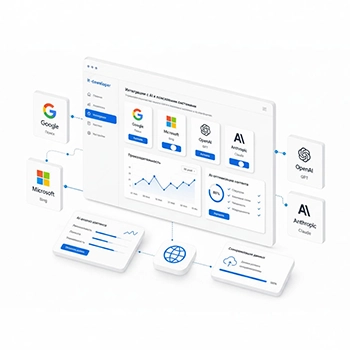
Artificial intelligence
Joomla and other CMS platforms: an honest comparison
We don't sell a single platform. Joomla is our main stack, but if another system suits the task better we will say so before the contract is signed, not after. Below: where Joomla is stronger, and where we will recommend an alternative ourselves.
Joomla
Strengths
Language versions and access rights are in the core, at no extra cost
Catalogue-friendly structure: categories, tags, custom fields on articles
The core is free, there are no mandatory renewals
Extensions don't touch the core — updates go through calmly
A built-in REST API for exchanging data with accounting systems
Weaknesses
Fewer ready-made themes and contractors on the market than WordPress
Some of the strongest extensions are paid
A steeper learning curve than a site builder
The visual builder is a separate paid licence
Best for
A commercial website with several languages, sections and editors. A company that wants to own its site and not pay for the right to use it.
Key topics
Joomla PHP REST API GPL YOOtheme Pro
WordPress
Strengths
A huge choice of themes and plugins for almost any task
Easy to find a contractor and replace them if needed
Simple publishing — an editor learns it in a day
The best ecosystem for a blog and a content project
Weaknesses
Multilingual support only via a paid plugin, and it is also the most fragile part
Access rights are poorer: separating editors precisely is hard
Many plugins mean more vulnerabilities and update conflicts
Its popularity makes sites a common target for automated attacks
Best for
A blog, a media outlet, a landing page, a simple single-language corporate site. We build on WordPress too — if that is the task, it is the honest choice.
Key topics
WordPress WooCommerce PHP GPL
Drupal
Strengths
Any data structure and any relationships between records
A serious security reputation — the choice of the public sector
Handles very large volumes of content well
Strong multilingual support and permissions handling
Weaknesses
Expensive to build and expensive to maintain
Few specialists available, changing contractor is painful
Hard for an editor to use without training
Overkill for a site of 20–50 pages
Best for
A large portal, a government or educational institution, a project with a complex database and a big editorial team.
Key topics
Drupal PHP Symfony GPL
Bitrix
Strengths
Ready-made ERP data exchange and a built-in CRM
Many ready-made modules for retail
Vendor support and formal guarantees
A single environment: website, tasks, telephony, documents
Weaknesses
A paid licence and mandatory renewals
Heavy code, requires powerful hosting
Strong vendor lock-in — leaving is expensive
Almost no advantage for a site without an accounting system
Best for
A retail company whose warehouse and accounting live in an ERP and which needs website data exchange from day one.
Key topics
Bitrix CRM ERP PHP
OpenCart
Strengths
Built for retail: catalogue, stock and orders out of the box
An inexpensive, fast start for a shop
Lightweight and undemanding on hosting
Many ready-made payment and courier modules
Weaknesses
Weak content handling: blogs and service pages are awkward to build
Many changes require editing the code
Languages and SEO have to be filled in with extensions
The quality of third-party modules varies wildly
Best for
A small shop that needs a catalogue and payments, with no content section planned.
Key topics
OpenCart E-commerce PHP MySQL
Site builders
Strengths
Launch within days
No need to think about hosting, updates or backups
A low starting budget
A simple editor for one person
Weaknesses
A subscription forever: stop paying and the site is gone
You don't own the code, migration is almost impossible
Limits on SEO, structured data and integrations
Non-standard logic cannot be added at all
Best for
A business card site, an event page, a quick test of an idea. If the project takes off, plan the move straight away.
Key topics
Wix Tilda Squarespace SaaS
Custom build
Strengths
Business logic of any complexity, with no compromises
Nothing redundant in the code — maximum performance
Any integrations and your own API
No third-party licences and no vendor dependency
Weaknesses
The highest price and the longest timeline
The admin panel and permissions also have to be written and paid for
Without a developer you cannot change even the text
A permanent team is needed for maintenance
Best for
A service, a marketplace, a customer portal with its own logic — where the site is not a shop window but the product itself.
Key topics
Laravel Symfony API Headless
Comparison of website management systems
How much a Joomla website costs
The price depends on the number of pages, the functionality required and the template chosen. The price list below is shared across all our services: we maintain it in one place and it is pulled in here automatically, so the figures are always current. We prepare an exact quote after a short conversation about your task.

Not sure which package to choose?
Get in touch, and we will find the right solution for your needs.
Modular web extensions
Extend your site as your business needs grow. This section lists individual functional modules, analytics services and promotion tools with a fixed implementation cost.
| Additional services and integrations | Price (EUR, B2B net) |
|---|---|
| Development, design and technical setup | |
| Building an online calculator (RSForm! Pro) | 70 – 185 |
| Online payment integration | 70 – 185 |
| Basic logo design | 50 – 100 |
| Building a portfolio / photo gallery (YOOtheme Builder) | 25 |
| Messenger integration | 25 |
| Setting up a corporate mailbox | 15 |
| Setting up contact forms and an FAQ section | 25 |
| Basic hosting setup (dhosting.pl) and SSL certificate installation | 25 |
| Google services and analytics | |
| Full configuration of Google services (GA4, GTM, Maps, Ads, Merchant Center) | 250 – 400 |
| Google Analytics and Google Tag Manager integration | 185 |
| Creating and launching a Google Ads campaign | 25 – 185 |
| Creating and configuring a Google Merchant Center profile | 25 – 185 |
| Creating and optimising a Google Maps profile (Google Business) | 25 |
| SEO, content and technical maintenance | |
| Fixing errors left by other developers | 15 / hour |
| Audit and correction of meta tags (Title, Description, H1) for SEO | 10 / hour |
| Blog management (layout and publishing in Joomla Articles) | 10 / post |
Custom development
For specific business needs, functionality not used before and complex solutions that cannot be priced within a package.
| Qualification | Junior | Senior |
|---|---|---|
| B2B hourly rate (EUR/hour) | 12.5 – 14.5€ | 33 – 42€ |
Frequently asked questions about Joomla development
Why do you recommend Joomla rather than WordPress?
We recommend what fits the task, and we build on both systems. Joomla wins when a site has several languages, many sections and several people with different permissions: all of that works in the core, without paid plugins that later conflict with each other. If you need a blog or a simple single-language site, we will tell you honestly that WordPress will be cheaper and simpler to maintain. The difference in build cost between the systems is small; the difference shows up later, in maintenance.
How much does a Joomla website cost and what affects the price?
Three things shape the price: the number of pages and sections, the functionality needed (shop, booking, customer portal, integrations) and the template chosen. A simple site on the stock template costs considerably less than a project with a custom design on YOOtheme. Current figures are in the price list above on this page — we maintain it in one place and it updates across the whole site at once. We give an exact quote after discussing the task, before work begins, with no “we'll see as we go”.
How long does it take to build a Joomla website?
A simple site on the stock template takes from one week. A corporate site with a custom design and several languages usually takes 3–6 weeks. A shop or a project with integrations takes longer, and the timeline depends mostly on how quickly we receive your texts, photos and access to the systems the site must connect to. We provide a stage-by-stage plan with dates, and every stage can be reviewed on a test URL before launch.
Will I be able to change texts and prices myself, or pay a developer every time?
You will. Texts, prices, photos, news and products are all edited in the admin panel without our involvement, and we show you how on a recorded call. If the site is built on YOOtheme, you can also change the page blocks themselves: reorder, add, hide. A developer is needed for new functionality or unusual layouts, not for correcting the phone number in the header. On top of that, Joomla lets you decide who gets which rights: a manager edits prices and never sees the site settings.
I have a Joomla site from another developer. Will you take it on for further work?
Yes, extending an existing Joomla site is routine work for us. We start with an audit: the core and extension versions, changes made to the code, the state of backups and security. You then get a list of what needs fixing urgently, what is worth doing later and what should be left alone, with a price for each item. If the previous contractor edited the core directly, we will say so plainly — sometimes a careful migration to a clean build works out cheaper than maintaining what is there. The decision is always yours.
Isn't Joomla an outdated CMS?
No. Joomla is actively developed: the core has been rewritten for modern PHP, there is a built-in REST API, native structured-data support and an update wizard. The “outdated” reputation trails behind versions from a decade ago and behind sites that simply nobody updated for five years. A long history is in fact a plus: the code is proven by time rather than rewritten from scratch every two years with broken compatibility. This site runs on current Joomla, and you can judge for yourself how it looks and how fast it loads.
What about security? People say Joomla sites are often hacked.
It is not Joomla that gets hacked but neglected sites: an old core, random extensions, a weak admin password, no backups. We close that off during development: only vetted extensions, restricted admin access, two-factor authentication, security headers, automated backups stored off the server. After that, regular updates are what matters — and that is the main part of maintenance. A site that is looked after runs quietly for years; a site nobody has opened for two years is vulnerable on any CMS.
I have an old Joomla version. Do I need to upgrade, and will I lose search rankings?
You do need to upgrade: unsupported versions no longer receive security fixes, and sooner or later the host will raise the PHP version on which the old site simply stops loading. Rankings are not lost with a careful migration — we preserve every page URL, and where the structure changes we set permanent redirects so that both visitors and search engines land on the right page. Work happens on a copy while the live site keeps running, and the switch takes minutes. Before we start we make a full backup we can roll back to.
What does Joomla website maintenance include, and is it compulsory?
Maintenance covers core and extension updates, backup checks, speed and uptime monitoring, small content edits and incident response. Nobody makes it compulsory: the site stays yours, you hold the credentials, and you can run it yourself or with another contractor. But maintaining a site is considerably cheaper than recovering it after a breach or an emergency PHP migration over a weekend. If you have no technical specialist of your own, it is better to take at least a minimal package.
Which countries do you work in?
Joomla development does not require meeting in person, so the client’s location is no constraint: we run projects for companies inside the European Union and beyond. We communicate in English, Polish and Russian, work by email and video calls, and handle paperwork remotely. The studio’s location affects neither the timeline nor the price — only the time-zone difference matters, and we agree on that at the start.
FAQ
Shall we discuss your Joomla project?
We will look at your current site or your brief, tell you what makes sense here and what would be overspending, and give you a timeline and a price before work starts. The consultation is free and commits you to nothing.